
How to Communicate in Beijing: A Practical Communication Guide for Foreign Tourists Traveling in Beijing
If you’re a foreign tourist worried about communicating in Beijing, you’re not alone.
I’ve lived in Beijing for over a decade and have met many travelers visiting China. While language barriers can be frustrating, the right preparation and tips can significantly reduce the difficulty of communicating.
Reading Guide: By reading this article, you’ll learn: how to choose and test translation tools; how to ask for directions, order food, and hail a taxi even if you don’t speak Chinese; how to save Chinese addresses to avoid destination errors; and how to handle emergencies when your internet connection drops or translation tools fail.
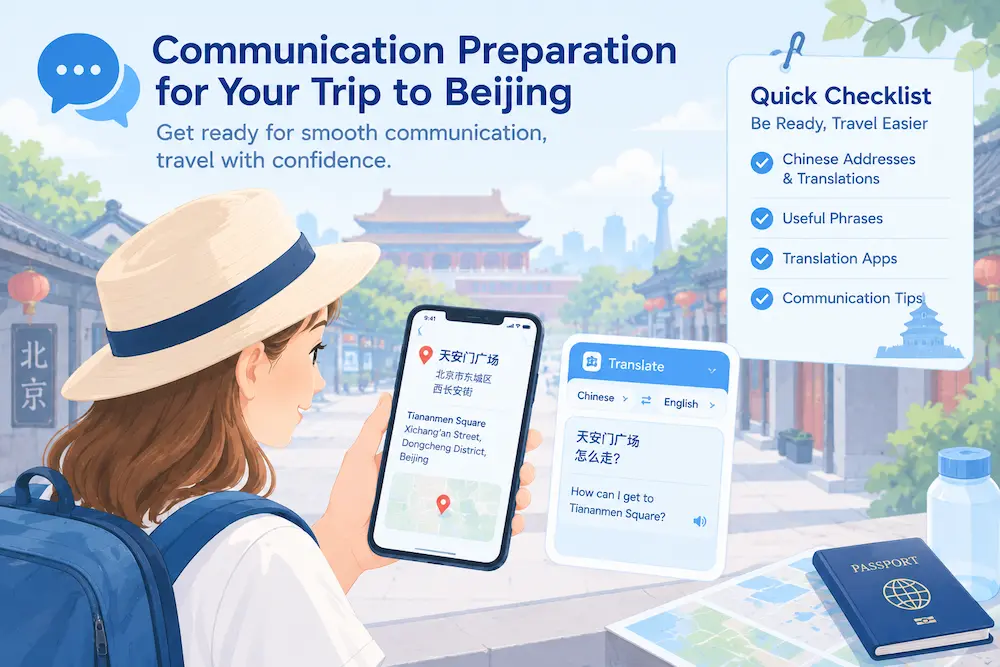
Table of Contents
Is It Hard to Communicate in Beijing?
Many people worry that they’ll face language barriers when visiting Beijing.
At major tourist attractions, hotels, and some popular shopping districts, you may come across staff who speak basic English, but English-language service isn’t guaranteed. In old hutongs, small street-side restaurants, and local shops, most locals have limited English proficiency, making in-depth communication difficult.
Sticking to well-established tourist attractions and large shopping districts makes communication relatively less stressful; however, if you want to explore the local streets and alleys in depth, be sure to prepare translation tools and screenshots in advance as a backup.
Key Tip: Don’t assume that “whether the other person speaks English” is a prerequisite for successful communication. Preparing Chinese screenshots and translation tools in advance is a safer bet than relying on others to understand English.
Communication and Translation Tools for Traveling in Beijing
Reference Table for Translation Tools
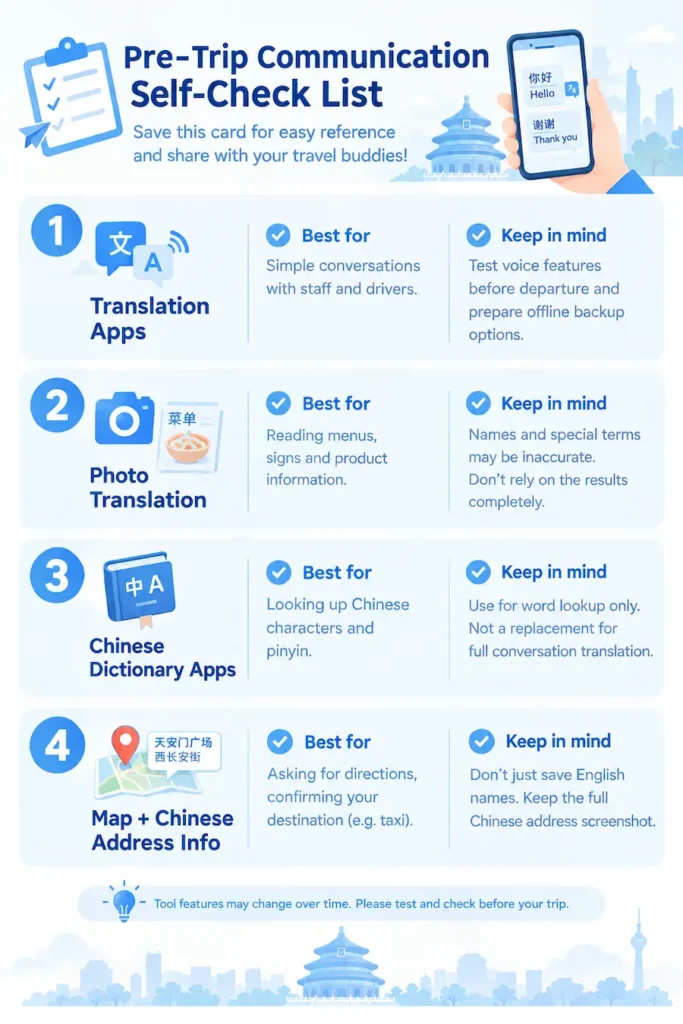
| Tool Type | Suitable Scenarios | Usage Notes |
| Voice-to-Text Translation | Simple conversations with store clerks or drivers | Test the voice function before departure and prepare an offline backup plan |
| Photo Translation | Recognizing menus, street signs, and product descriptions | Translation errors may occur with dish names and proper nouns; do not rely solely on the results |
| Chinese Dictionary Tools | Look up definitions of Chinese characters and pinyin | Suitable for looking up individual words and characters; cannot directly replace translation for full conversations |
| Maps + Chinese Address Resources | Asking for directions or confirming destinations when hailing a taxi | Do not save only English place names; be sure to save screenshots of the full Chinese addresses |
1. Google Translate: Do not assume it will work normally with an internet connection in mainland China. Even when using roaming or an eSIM, internet connectivity is unreliable; if you plan to use it, be sure to download offline language packs before departure and test the offline functionality while disconnected from the internet.
2. Microsoft Translator: Supports offline translation, two-way voice translation, and photo translation, and can serve as an alternative tool; Be sure to test its actual performance on your device and under your network conditions before traveling.
3. Pleco: This app is primarily a Chinese dictionary tool, excelling at recognizing Chinese characters and looking up pinyin and definitions; it is better suited for character lookup and learning, and is not entirely equivalent to real-time conversation translation software.
Important Practical Reminder:
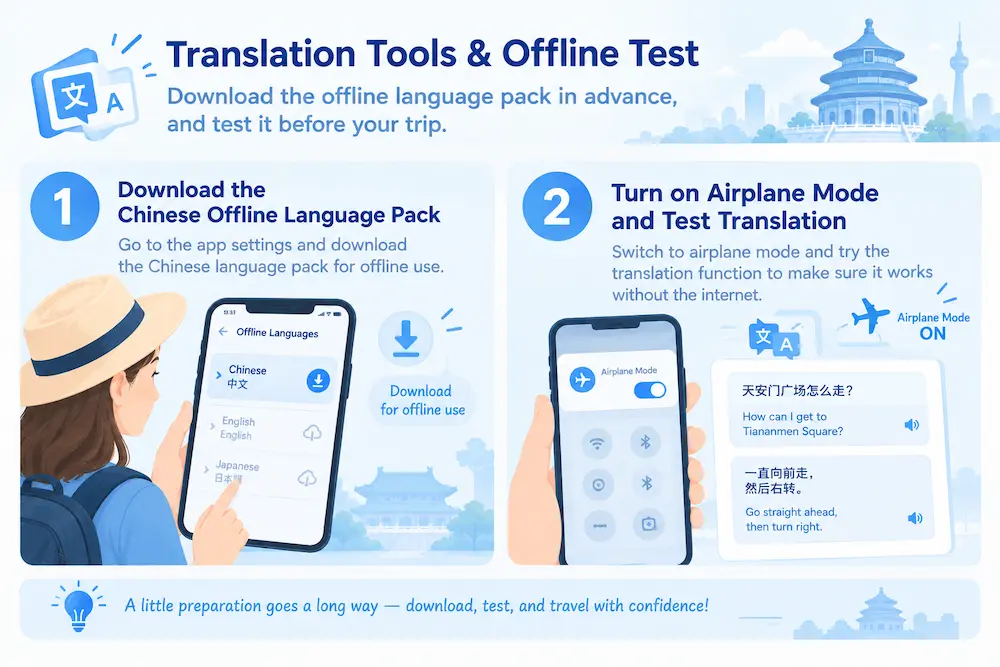
Downloading an offline package does not guarantee it will work. Before departure, enable Airplane Mode and thoroughly test the offline translation feature to confirm it works properly without an internet connection.
Practical Tips
- Download the Chinese offline package in advance before departure to avoid being unable to use the app due to a lack of internet access once you arrive.
- Use photo translation directly for restaurant menus, street signs, and product descriptions—it’s much faster than typing them out manually.
Simple Chinese Phrases That Actually Help
When traveling in Beijing, knowing a few authentic Chinese phrases is the perfect key to unlocking amazing experiences and connecting with locals. When you make the effort to speak their language, you’ll often be rewarded with warmer smiles and more enthusiastic assistance.
Remember, the key is to just go for it. Most Chinese people are incredibly friendly and genuinely appreciate the effort foreigners make to speak their language. Even if your pronunciation isn’t perfect, your attempt itself builds the strongest bridge of communication.
Tip: For the short sentences below, focus on memorizing the ones you use most frequently—you don’t need to memorize them all. When encountering complex situations, using screenshots and translation apps can be more helpful.
1. Polite Opening: Excuse me! / Sorry!
Pronunciation: Láojià! / Bù hǎo yìsi!
When to use: When you need someone to move out of the way, get a server’s attention, or make a minor interruption.
2. The universal directions phrase: Qǐngwèn, zhège / dìfang zěnme zǒu?
Pronunciation: Qǐngwèn, zhège / dìfang zěnme zǒu?
When to use: Your lifesaver when lost. Point to a map, address on your phone, or any specific location.
3. Quickly locating something: Where is…?
Pronunciation: … zài nǎr ne?
When to use: When looking for restrooms, subway stations, exits, or specific shops. (e.g., “Where is the restroom?”)
4. Ordering with ease: This one / One portion, please.
Pronunciation: Zhège / lái yí fèn, xièxie.
When to use: Ordering at restaurants or street food stalls. Point directly to the dish you want.
5. Directly Asking the Price: Duō shao qián?
Pronunciation: Duōshao qián?
When to use: At markets, small shops, or anytime you need to ask the price or pay.
6. Attempting to bargain: Can you make it cheaper? / Would a discount be possible?
Pronunciation: Néng piányi diǎn ma? / Piányi diǎn xíng ma?
Usage: When shopping at night markets, souvenir stalls, or other places where bargaining is common.
7. Requesting takeout or packing: Pack it up / Take it away.
Pronunciation: Dǎbāo / Dàizǒu.
When to use: When you can’t finish your meal at a restaurant or want to take food away.
8. Connecting to Wi-Fi: Is there Wi-Fi? What’s the password?
Pronunciation: Yǒu Wi-Fi ma? Mìmǎ shì duōshao?
Use: Asking for wireless network access in cafes, restaurants, or hotels.
9. When you don’t understand a request, ask them to repeat it: Sorry, could you please speak a little slower? Could you say that again?”
Pronunciation: (Bù hǎo yìsi, qǐng shuō màn yì diǎn, kě yǐ zài shuō yí biàn ma?)
Situation: The other person is speaking too fast, and you can’t understand what they’re saying.
10. Food Allergy Notice: I’m allergic to ____. (Wǒ duì ____ guòmǐn.)
Situation: Notifying the server of a food allergy when ordering; ⚠For severe allergies, don’t rely solely on verbal communication—it’s recommended to take a screenshot of the allergy information and show it to the server for confirmation.
11. Confirming a destination: Is this ____? (Qǐngwèn shì dào ____ zhèlǐ ma?)
Situation: To confirm you’ve arrived at the correct location after taking a taxi or asking for directions.
My Most Effective Communication Tips for Real Life (Tested and Proven Effective Over Many Years)
Even if you know almost no Chinese, there are plenty of ways to communicate without any stress.
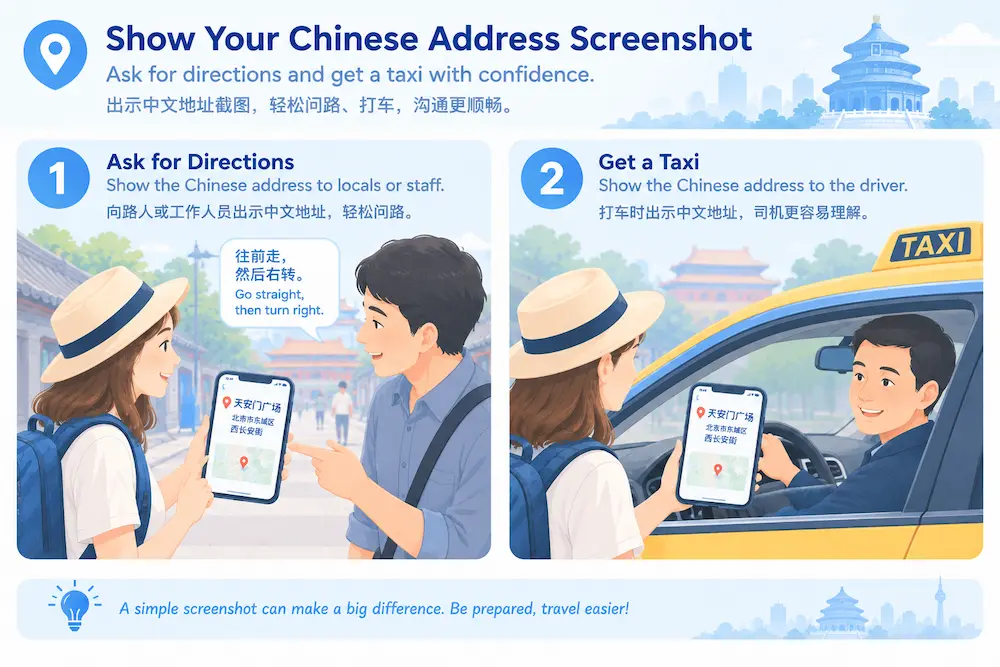
1. Show a Screenshot of the Chinese Address
- Before you leave, save a screenshot of the hotel or attraction’s full Chinese name + detailed address;
- If you’re visiting a large tourist attraction, try to confirm the specific entrance rather than just saving the general name of the attraction;
- Save the screenshots to your photo album so you can access them even without an internet connection;
- Upon arrival, briefly double-check that the driver understands your destination—don’t assume you’ve arrived just because the location appears close on the map.
2. Show the Map Page When Taking a Taxi
Showing the driver the map page of your destination can significantly reduce communication misunderstandings, though it can’t eliminate misinterpretations. Be sure to briefly confirm the destination after getting in the car.
3. Use Gestures and Simple Body Language to Aid Communication
When shopping, ordering food, or asking for directions, point at the item with your finger and use a smiling gesture to help convey your intent.
4. Take Photos to Identify Menus and Signs
If you can’t read a menu, sign, or street sign, take a photo and use a translation app to identify it, or show the photo to the person you’re speaking with.
How Can You Order Food in Beijing If You Don’t Speak Chinese?
Some restaurants offer picture menus, while many small eateries only have paper menus in Chinese or digital menus accessible via QR codes.
- Option 1: If there’s a picture menu, simply point to the dish you want to order.
- Option 2: If the menu is in Chinese only, take a photo and use a translation app; if the translation is unclear, show the translated text to the staff for confirmation.
- If you encounter a QR code for ordering but can’t read the Chinese page, try taking a photo and translating the content; if you still have trouble, politely ask the staff if they can provide a paper menu to help you order.
- Option 3: If you have food allergies or dietary restrictions, don’t rely solely on verbal descriptions; prepare a screenshot of your allergy information to show and confirm.
My Real-Life Experience (Tested at a Hutong Eatery):
Many small hutong restaurants don’t have English menus, but by pointing at dishes and using simple gestures, you can usually place your order without any trouble.
How to Hail a Taxi / Use Didi When You Don’t Speak Chinese
Didi Chuxing is the leading ride-hailing app in China. There may be uncertainties regarding registration and payment verification with an international phone number, so we recommend completing registration, logging in, and testing payments on your own before departure—don’t wait until you arrive to try it for the first time.
- Key Point: When hailing a taxi, be sure to use a Chinese address; do not provide only an English one, as most drivers cannot read English.
- Save a screenshot of your hotel’s full Chinese name and address in advance, and show it to the driver when you get in the car.
Additional Key Reminder:
Many major tourist attractions and transportation hubs have multiple entrances and exits; briefly double-check your destination before getting in the car; and confirm your actual drop-off location at the end of the ride to avoid exiting at the wrong entrance or exit.
Showing a Chinese address can only reduce communication barriers; it does not completely eliminate misunderstandings.
The Other Person Doesn’t Understand English
The Other Person Doesn’t Understand English
In Beijing, it’s quite common for taxi drivers, small shop owners, and ordinary passersby not to speak English.
Solution: Don’t force yourself to speak English. Instead, use Chinese addresses, pictures, gestures, or translation apps—this is more efficient.
Translation software output error
Machine translation can occasionally be inaccurate, especially with dialects, dish names, and street signs, which may lead to misunderstandings.
Solution: Use photo translation more often and avoid long sentences; if you’re unsure, point to the text and confirm the meaning before proceeding.
No Internet / No Signal
Subways, basements, and remote alleys often have poor or no internet connection, making online translation unusable.
Solution: Download offline translation packages in advance and save screenshots of the Chinese addresses for hotels and attractions; this way, you can use them even without an internet connection.
What should you do if neither translation nor pictures help you get your point across?
Steps to take:
① Stop repeating long English sentences; instead, use short, key words;
② Show them prepared screenshots in Chinese or photos of the actual items;
③ Use a translation app to translate your request into Chinese text and display it;
④ For important information such as directions or money, try to clarify it as much as possible—don’t take action if there’s any confusion.
✅Pre-Departure Communication Checklist (Feel free to take a screenshot and save it)
□ Download offline language packs for your translation app; test to ensure they work offline in Airplane Mode
□ Save screenshots of the full Chinese names and addresses of hotels and attractions; confirm the entrance and exit locations of tourist sites
□ Prepare short Chinese phrases or text screenshots for allergies and emergency assistance
□ Register for ride-hailing apps in advance and test payment methods
□ Save screenshots of important orders in case of internet outages
□ Plan backup communication methods (such as pictures or gestures) in case translation fails
Final Advice from Someone Who Has Lived in Beijing for Many Years
Most residents in Beijing are happy to offer whatever help they can.
A smile and patience are very useful tools for cross-cultural communication. Even if you don’t speak the language, you can handle most everyday travel situations by using screenshots, pictures, gestures, and translation apps.
If you encounter a difficult situation, prioritize asking staff at tourist attractions or hotels for help.
Author’s Note: This article is based on years of on-the-ground research; registration rules for apps and platforms are subject to change, so please test the tools yourself to ensure they’re working before you travel.