How Do Foreigners Use Alipay in Beijing? Registration, Linking a Card, Scanning QR Codes to Pay, and Frequently Asked Questions
When visiting Beijing, many international tourists find themselves confused by the local mobile payment environment. Alipay is a widely used tool in China, but many people aren’t sure how foreigners can register and link a bank card, or what restrictions they might encounter when making payments with Alipay.
This practical guide will help you understand the key steps for using Alipay in China, how to troubleshoot issues, and how to prepare for payments before your trip.
Visiting Beijing for the First Time? Start by Addressing These 3 Payment Issues
1. Can I complete Alipay identity verification and link an international bank card with a foreign passport?
2. How do I pay at restaurants, small shops, the subway, and other places?
3. If an Alipay payment fails, what are some backup solutions?
For foreign tourists visiting Beijing for the first time, we recommend setting up and testing your mobile payment options before your trip, rather than trying to figure it out on the spot after arriving in China.
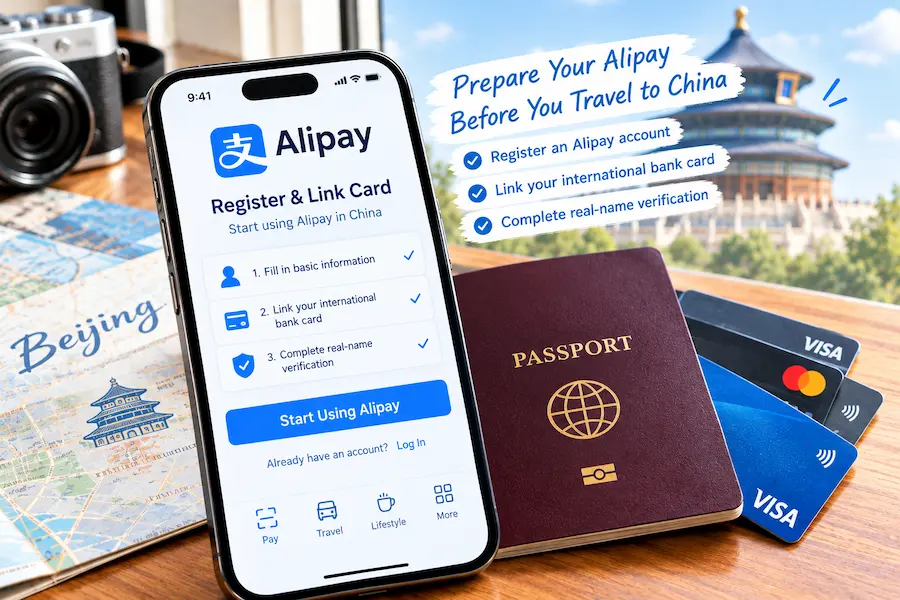
Table of Contents
Can foreigners use Alipay in China?
The answer is yes, and you don’t need a Chinese bank card—this feature is officially supported by Alipay.
Verify your account with your passport, and you can link major international credit cards, such as Visa or Mastercard. No more worries about exchanging cash or dealing with change—effortlessly integrate into China’s cashless lifestyle.
Travel Tip: If you’re just visiting Beijing for a short trip, there’s no need to master every feature of Alipay; just make sure you’ve completed registration, linked your card, and can make a small payment—that’s enough to handle most everyday situations.
⚠Your experience may vary depending on your card issuer, the transaction scenario, and the platform’s current policies; not all international cards are 100% compatible with every transaction.
Why Do I Recommend Setting Up Alipay in Advance for Your First Trip to Beijing?
It’s not that you “must use Alipay” when you come to Beijing. While many supermarkets, restaurants, and tourist attractions in Beijing support mobile QR code payments, setting up Alipay in advance can make everyday transactions—such as dining, hailing a taxi, and buying tickets—run more smoothly. However, you should also have a backup payment method ready and not rely solely on a single option.
Alipay Registration and Bank Card Linking
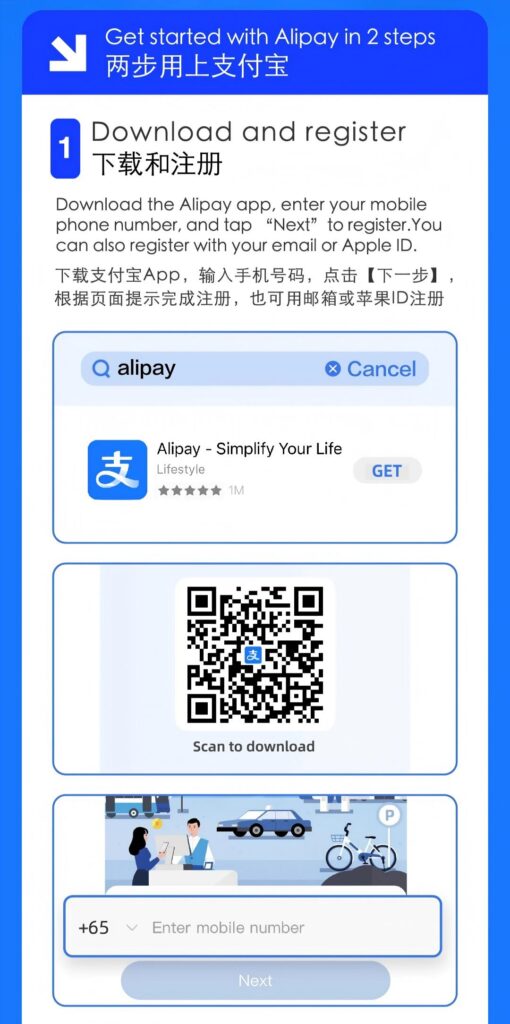
1. Download and Register: Search for “Alipay” in the App Store or Google Play to download the Alipay app; international visitors should choose the international version, as its multilingual interface is better suited for users overseas. Register an account using an international phone number or email address, and follow the on-screen prompts to complete verification.
2. Link a Bank Card: Go to the “Bank Card Management” page in your account and select “Add Bank Card.” Follow the app’s instructions to enter your international bank card information and complete the SMS verification.
ℹTip: Supported card types and the card-linking page may change with app updates; please refer to the actual display within the Alipay app.
✅After linking your bank card, be sure to test it once before departure
1. Confirm that the bank card status shows “Successfully Linked”;
2. Confirm that your phone can receive SMS verification codes from overseas;
3. If possible, complete a small test payment to ensure the payment process works smoothly;
4. Prepare a second backup payment method in advance; do not rely solely on this one account.
Appendix: Steps to Register for Alipay
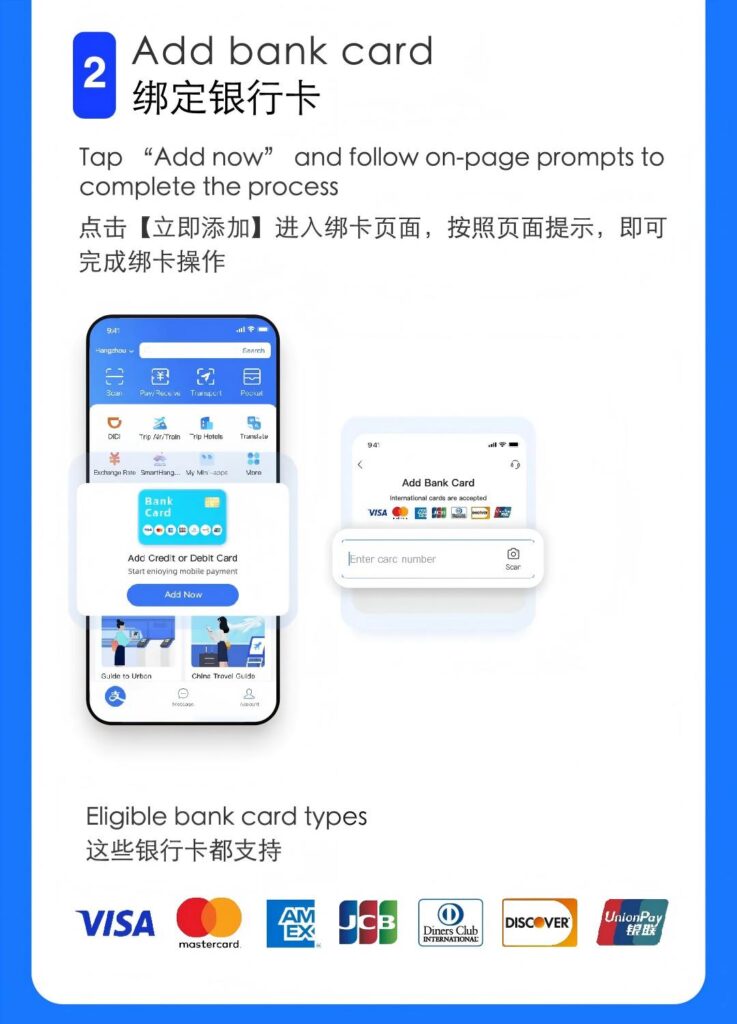
Can international credit cards such as Visa, Mastercard, and Amex be linked to Alipay?
| Card Type | Tips for Travelers |
| Visa | Widely supported; card linking and payment are subject to the actual status displayed on the app |
| Mastercard | Widely supported; card linking and payment are subject to the actual status displayed on the app |
| JCB | Used by some international travelers; final support status is subject to the app’s prompts |
| Diners Club | You may try linking it; whether it can be used depends on the platform’s current policies |
| Amex (American Express) | Compatibility varies significantly; we do not recommend using it as your sole primary payment card—be sure to have a backup card ready |
Note:
Whether you can link a card and complete a transaction also depends on whether your issuing bank has enabled authorization for overseas online transactions. Before linking a card, we recommend contacting your issuing bank to confirm that overseas online transactions have been enabled.
Are there additional fees for paying with an international credit card?
1. Alipay Platform: Service fee policies for international cards are subject to dynamic updates. Please carefully review the fee information displayed on the payment page before making a transaction.
2. Your Issuing Bank: Some international credit cards charge overseas transaction fees and currency conversion fees. These fees are charged by your issuing bank and are independent of the Alipay platform; please refer to your credit card terms and conditions for the applicable rates.
3. Transaction Limits: Both the platform and your issuing bank set transaction limits. We recommend confirming these limits in advance before making large purchases.
Where can you typically use Alipay when traveling in Beijing?
- Dining: Fine-dining restaurants, home-style eateries, and bubble tea shops;
- Transportation: Subway, ride-hailing services, bike-sharing, and admission tickets to some tourist attractions;
- Shopping: Large shopping malls, convenience store chains, and shops selling cultural and creative products and local specialties;
- Other: Check-in at some hotels and vending machines.
⚠️Important Reminder:
Just because a merchant displays an Alipay QR code doesn’t mean your internationally linked card will necessarily be accepted for the transaction. A small number of independent small businesses do not have the authorization to accept foreign cards, so we recommend paying close attention to any error messages on the screen during your first small-amount transaction.
How exactly does Alipay QR code payment work?
Alipay’s QR code payment has two modes, both of which are very common and simple to use:
Mode 1: You scan the merchant’s payment QR code
Open the “Scan” feature on the Alipay homepage, aim it at the merchant’s Alipay payment QR code, enter the payment amount, and confirm to complete the transaction.
Mode 2: The merchant scans your payment QR code
Open the “Payment QR Code” page in Alipay, show your payment QR code to the merchant, and once the merchant scans it with a scanner, the corresponding amount will be automatically deducted without you having to enter any numbers. This is ideal for quick checkout scenarios.
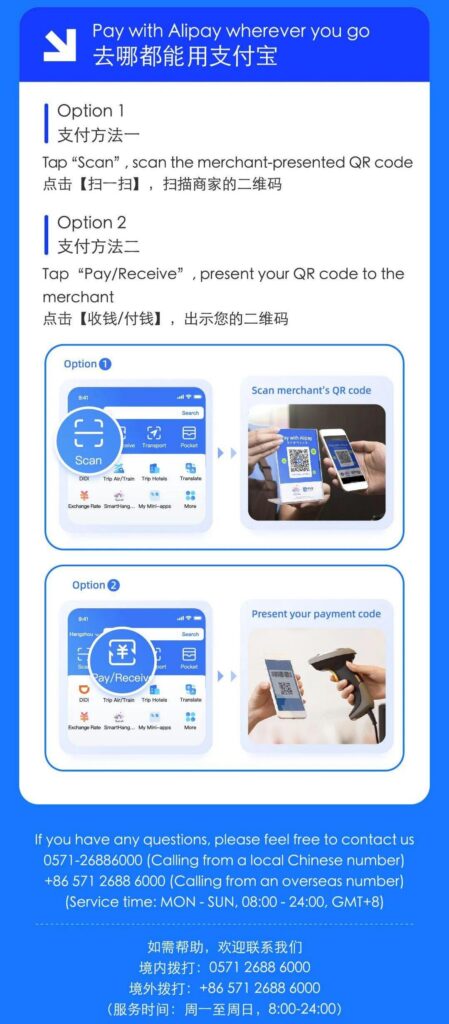
Not sure who to scan? Here’s a simple guide
- If the merchant hands you a paper QR code → Open your “Scan” app and scan it yourself.
- If the merchant asks you to show your payment code → Open the payment code page and let them scan it with their device.
After entering the payment amount, double-check that it’s correct before tapping “Confirm.”
The 5 Most Common Issues Foreign Tourists Face When Using Alipay
1. Payment blocked by risk control: This is a security check performed by the platform’s risk control system. Try making a small-amount transaction again; do not repeatedly attempt large-amount payments.
2. Failed to link a bank card: Verify your card number and SMS verification code, then contact your issuing bank to confirm whether they restrict online card linking for overseas transactions.
3. Card linked successfully, but payment failed: Linking a card does not guarantee a successful transaction; this may be due to multiple factors, such as platform spending limits, blocking by the issuing bank, or the merchant not accepting foreign cards.
4. Unable to complete payment by scanning a QR code at a small street vendor: Small, independent shops may not accept foreign cards; this is a common occurrence.
5. Mobile network issues or failure to receive SMS verification codes: Before traveling abroad, ensure your phone is set up for international roaming and have a backup Wi-Fi connection.
✅Key Principle: Never rely on a single payment method alone.
My Experience Using Alipay Long-Term in Beijing
I’ve lived in Beijing for many years and use Alipay daily for getting around, eating out, and hailing taxis. For foreign tourists visiting China, its value lies in consolidating a wide range of everyday expenses into a single app, making travel more convenient.
However, you may still encounter occasional issues such as risk controls or merchants not accepting foreign credit cards. As long as you have a backup plan, these issues won’t affect your overall travel experience.
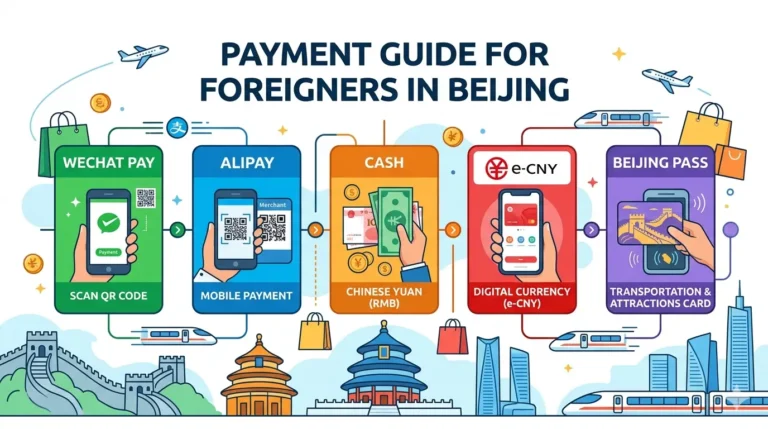
Visiting Beijing for the First Time: How Should You Prepare for Alipay, WeChat Pay, and Cash?
| Payment Method | Best Uses | Things to Keep in Mind |
| Alipay | Daily QR code payments, some public transportation and attraction tickets | Register, link your card, and test with a small amount before your trip |
| WeChat Pay | As a backup mobile payment option | The process for linking foreign cards is relatively complex; use it as a backup |
| RMB Cash | As an emergency backup in case of payment issues | No need to carry large amounts of cash; a small amount is sufficient |
Practical Tip: It’s not recommended to rely solely on a single payment method. Prioritize Alipay as your primary mobile payment method, while also preparing a second bank card and a small amount of RMB cash as a safety net.
Tips for Foreigners Using Alipay
- Payment Exchange Rates: When paying with an international card, transactions are settled based on the issuing bank’s real-time exchange rate. The final amount charged will be as shown on your bank statement.
- Changing Your Phone Number: You can use an overseas phone number during registration. If you obtain a local Beijing phone number, you can update it directly in Alipay settings without affecting your account usage.
- Functional Limitations: The international version of Alipay currently does not support features such as red packets, transfers to friends, or wealth management. It supports only in-person payments, so you don’t need to try other functions.
- Account Settings: We recommend enabling a payment password or fingerprint verification to enhance the security of your account funds.
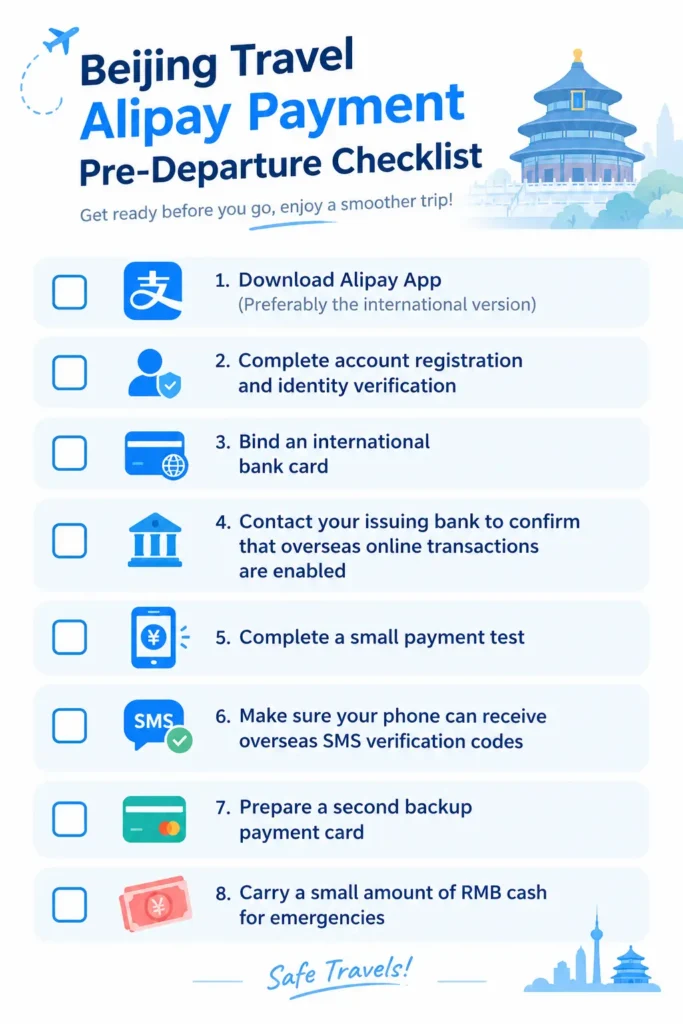
Alipay Payment Checklist Before Traveling to Beijing (Perfect for Screenshotting and Saving)
□ Download the Alipay app (preferably the international version)
□ Complete account registration and identity verification
□ Link an international bank card
□ Contact your card issuer to confirm that online transactions overseas are enabled
□ Complete a small test payment
□ Ensure your phone can receive SMS verification codes from overseas
□ Have a second backup bank card ready
□ Carry a small amount of RMB cash with you for emergencies
If it’s your first time in Beijing, we recommend familiarizing yourself with these travel tips in advance
- How to use the Beijing subway and buses
- How to hail a taxi in Beijing
- Things to keep in mind when using navigation apps in China
- How to order at restaurants if you don’t speak Chinese
- A guide to using WeChat Pay for international travelers
We recommend reading 2–3 relevant survival guides first to ensure you’re fully prepared for payments and transportation.
Author’s Note: This article is based on publicly available product information and hands-on experience. Policies regarding Alipay’s foreign card linking, transaction fees, and spending limits are subject to change; please refer to the current in-app pages for the most up-to-date information.